
Odoo Warehouse Management: A Guide to Tracking Stock

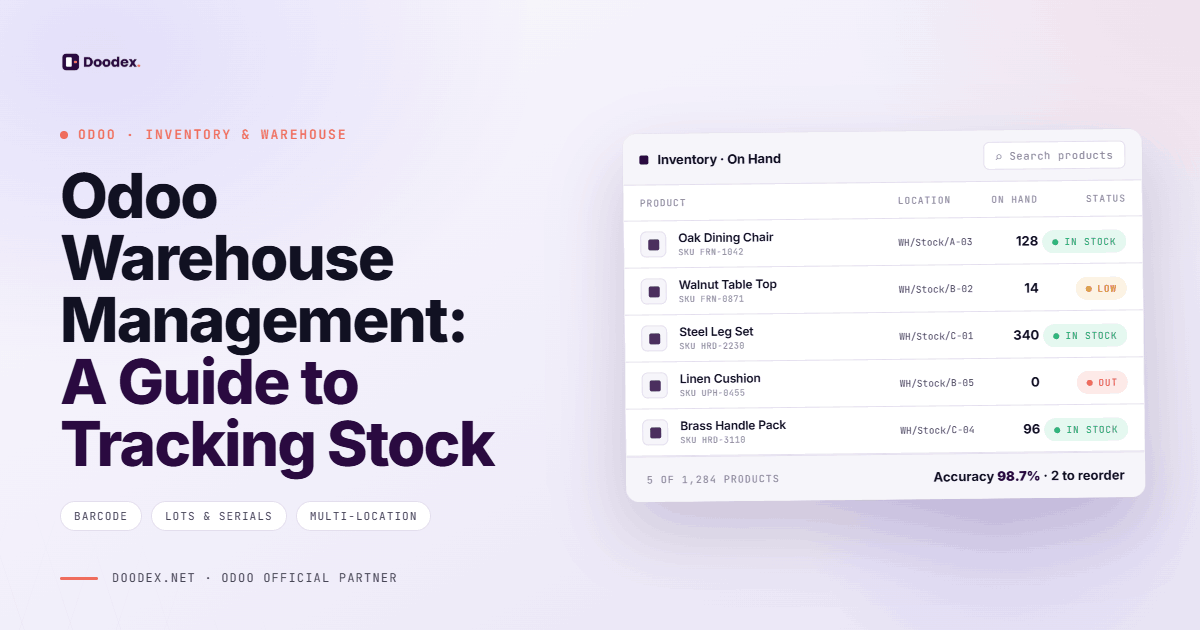
Effective odoo warehouse management is the backbone of any business that relies on accurate inventory control. Whether you're managing a single warehouse or a complex network of multiple warehouses, Odoo's powerful inventory module gives you complete visibility over every stock movement — from incoming shipments to outgoing deliveries.
This guide walks you through everything you need to know about tracking stock movements with Odoo, setting up your warehouse management system, and using Odoo's tools to reduce operational costs, eliminate manual labor, and enhance customer satisfaction.
session
Optimize Your Odoo Warehouse Management
Get expert guidance on setting up warehouses, inventory tracking, and automated replenishment tailored to your business operations.
Book a free sessioncontents
- 01What Is Odoo Warehouse Management?
- 02Setting Up Multiple Warehouses in Odoo
- 03Accurate Inventory Valuation with Odoo
- 04Receiving Products and Managing Incoming Shipments
- 05Inter Warehouse Transfers
- 06Outgoing Shipments and Order Fulfillment
- 07Automated Stock Replenishment
- 08Inventory Tracking and Reporting
- 09Quality Control in Warehouse Operations
- 10Reducing Operational Costs
- 11Integration with Other Odoo Modules
- 12Conclusion
- 13Why Choose Doodex
- 14FAQs
takeaways
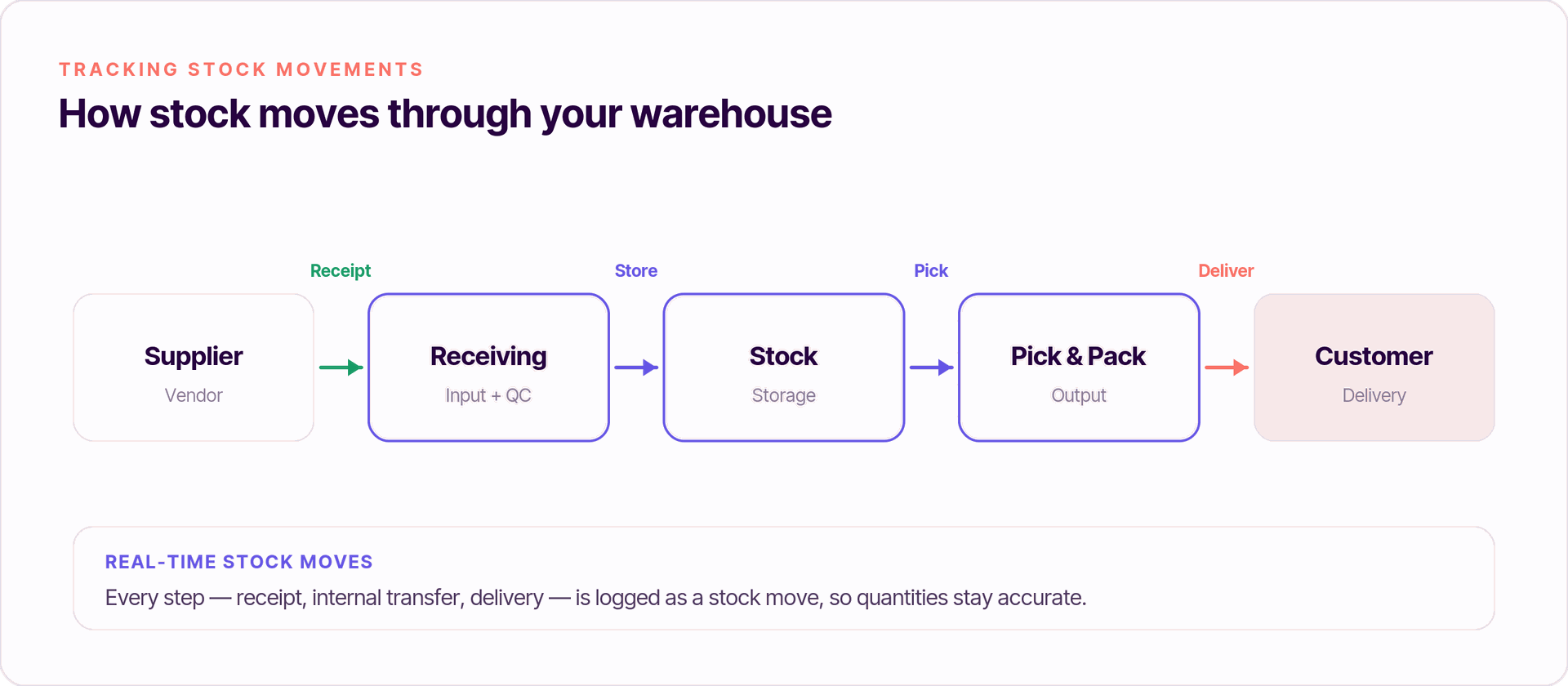
Real time visibility across all stock movements — incoming shipments, internal transfers, and outgoing deliveries — from a single platform.
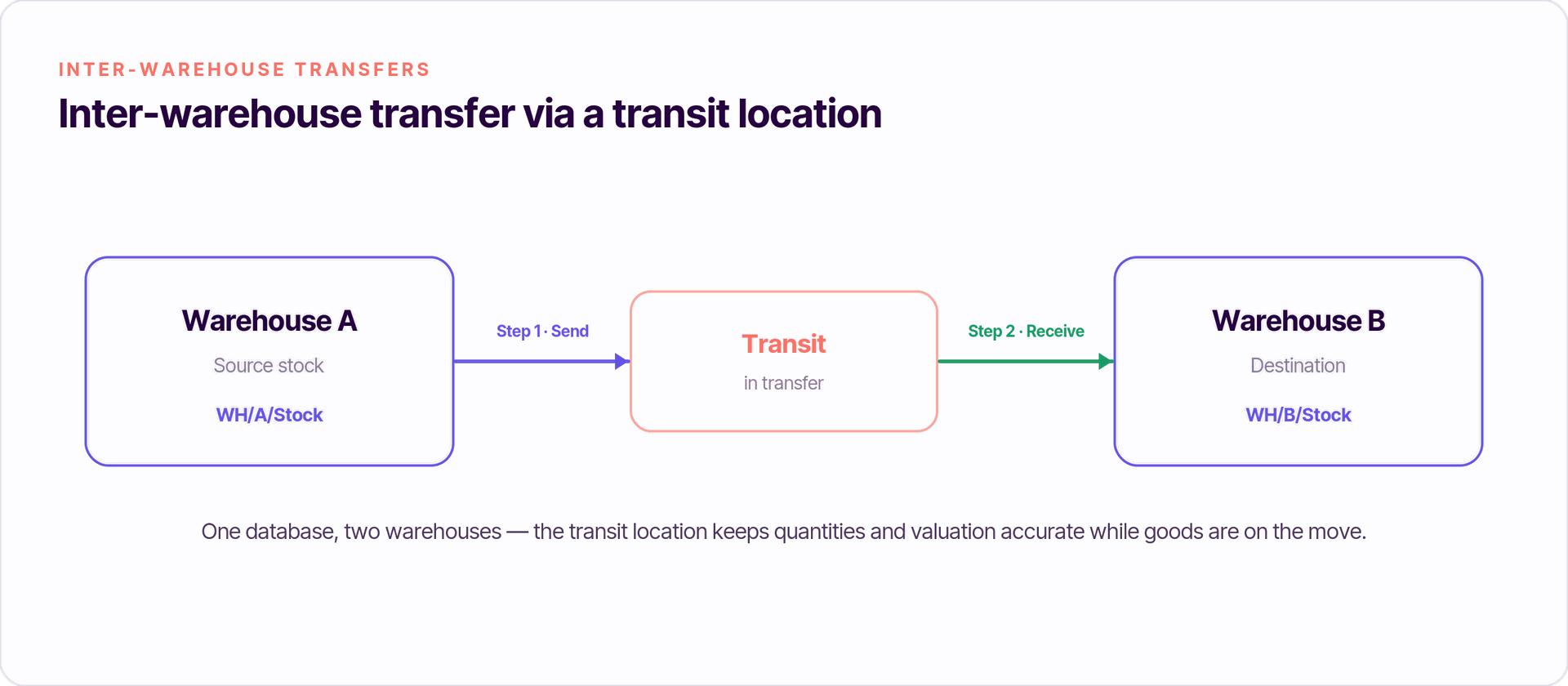
Multiple warehouses managed from one Odoo database, with inter warehouse transfers handled automatically and inventory valuation updated in real time.
Automated stock replenishment via reordering rules eliminates manual tracking, reduces human error, and ensures stock levels never fall below minimum thresholds.
Batch picking and smart replenishment strategies significantly reduce operational costs and manual labor in high-volume warehouse operations.
Complete traceability through lot and serial number tracking ensures every stock movement is recorded from receipt to delivery.
Seamless integration with Sales, Purchase, Manufacturing, and Accounting makes Odoo a true end-to-end inventory management system.
What is Odoo warehouse management?
Odoo warehouse management is a built-in module within the Odoo ERP platform that allows businesses to manage stock levels, track inventory movements, and automate warehouse operations from a single platform. Unlike standalone warehouse management system (WMS) solutions, Odoo integrates inventory tracking directly with your sales, purchasing, manufacturing, and accounting modules.
With the Odoo inventory app, warehouse managers gain real time visibility into stock quantities across all storage locations, making it easier to make informed decisions and maintain accurate inventory valuation at all times.
Key Features of Odoo Warehouse Management
- Real time inventory tracking across all warehouses and storage locations in the Odoo inventory management system, with stock control that improves operational efficiency, and integration with sales and purchasing modules
- Automated stock replenishment using reordering rules and smart inventory replenishment strategies to set minimum stock levels
- Inter warehouse transfers for businesses operating a warehouse network
- Batch picking to speed up order fulfillment and reduce manual effort
- Complete traceability of every stock movement from receipt to delivery
- Advanced reporting tools for inventory performance and inventory valuation
- Quality control checkpoints built into warehouse processes
- Inventory adjustments to correct inventory discrepancies quickly
Odoo's open-source, modular design also makes it easy to customize and scale functionality as needed.
Setting Up Multiple Warehouses in Odoo
Before tracking stock movements, you need to configure your warehouse structure. Odoo makes it easy to manage multiple warehouses from a single Odoo database.
Creating Warehouses
Navigate to Inventory > Configuration > Warehouses and click Create. Fill in:
- Warehouse Name — a descriptive name for the location
- Short Name — a 2–5 character code used in warehouse documents
- Company's Address — linked to the correct legal entity
Each warehouse you create automatically generates a default warehouse with its own incoming and outgoing shipment routes, as well as a default set of reordering rules.
Defining Storage Locations
Go to Inventory > Configuration > Locations to set up your storage locations within each warehouse. Odoo supports:
- Internal locations — storage areas inside your warehouse space
- Input/Output locations — staging zones for incoming shipments and outgoing shipments
- Virtual locations — for tracking inventory adjustments, scrap, or purchase components
Properly structured storage locations give warehouse teams full control over where every item is at any moment.
Managing more than one warehouse location?
Accurate Inventory Valuation with Odoo
Accurate inventory valuation is critical for financial reporting and supply chain operations. Odoo supports multiple costing methods — FIFO, Average Cost, and Standard Price — allowing you to choose the method that best reflects your business operations.
When stock movements are recorded in Odoo, the system automatically updates your inventory valuation in real time and synchronizes it with your accounting entries. This eliminates manual tracking errors and ensures your financial statements always reflect the true value of your stock.
To review your valuation, go to Inventory > Reporting > Inventory Valuation.
Receiving Products and Managing Incoming Shipments
Inventory tracking begins the moment products arrive at your warehouse. Odoo warehouse management handles incoming shipments through a structured receipts process.
Creating Purchase Orders
Navigate to Purchase > Orders > Purchase Orders and create a new order. Specify:
- Supplier details and delivery address
- Products and stock quantities expected
- Scheduled delivery date
Odoo automatically creates a receipt linked to the purchase or manufacturing orders when confirmed, eliminating duplicate data entry and reducing human error.
Validating Receipts
Once goods arrive, validate the receipt in Inventory > Operations > Receipts. This action:
- Updates stock levels in real time
- Records the stock movement in the inventory management system
- Triggers inventory valuation updates
- Can initiate quality control checks if configured
For businesses that need complete traceability, Odoo supports lot and serial number tracking at this stage.
30 minutes
Need Help Setting Up Odoo Warehouse Management?
Doodex specialists help you configure warehouses, locations, replenishment rules, and inventory tracking to match your exact business operations.
Book a free sessionInter Warehouse Transfers
For companies operating a warehouse network with multiple warehouses, inter warehouse transfers are essential for balancing stock levels and reducing excess storage costs.
Creating Internal Transfers
Go to Inventory > Operations > Transfers and create a new transfer. Select:
- Source location — where the stock is coming from
- Destination location — where it needs to go
- Products and quantities to move
Odoo automatically creates the necessary warehouse documents and updates stock quantities in both locations when validated. This provides real time visibility across your entire warehouse network.
Managing Multiple Locations
When managing multiple locations, Odoo's putaway rules help warehouse teams direct incoming stock to the most appropriate storage locations automatically, minimizing manual labor and reducing picking errors.
Want a complete overview of Odoo's stock management features?
Outgoing Shipments and Order Fulfillment
Tracking outgoing shipments is just as important as monitoring incoming goods. Odoo links every delivery directly to a sales order, giving you complete traceability from customer order to final shipment.
Processing Deliveries
Navigate to Sales > Orders > Sales Orders, confirm the order, and validate the delivery in Inventory > Operations > Delivery Orders. Odoo automatically:
- Reduces stock levels at the correct storage location
- Records the outgoing stock movement
- Updates inventory performance metrics
- Triggers automated stock replenishment if stock falls below minimum stock levels
Batch Picking for High-Volume Operations
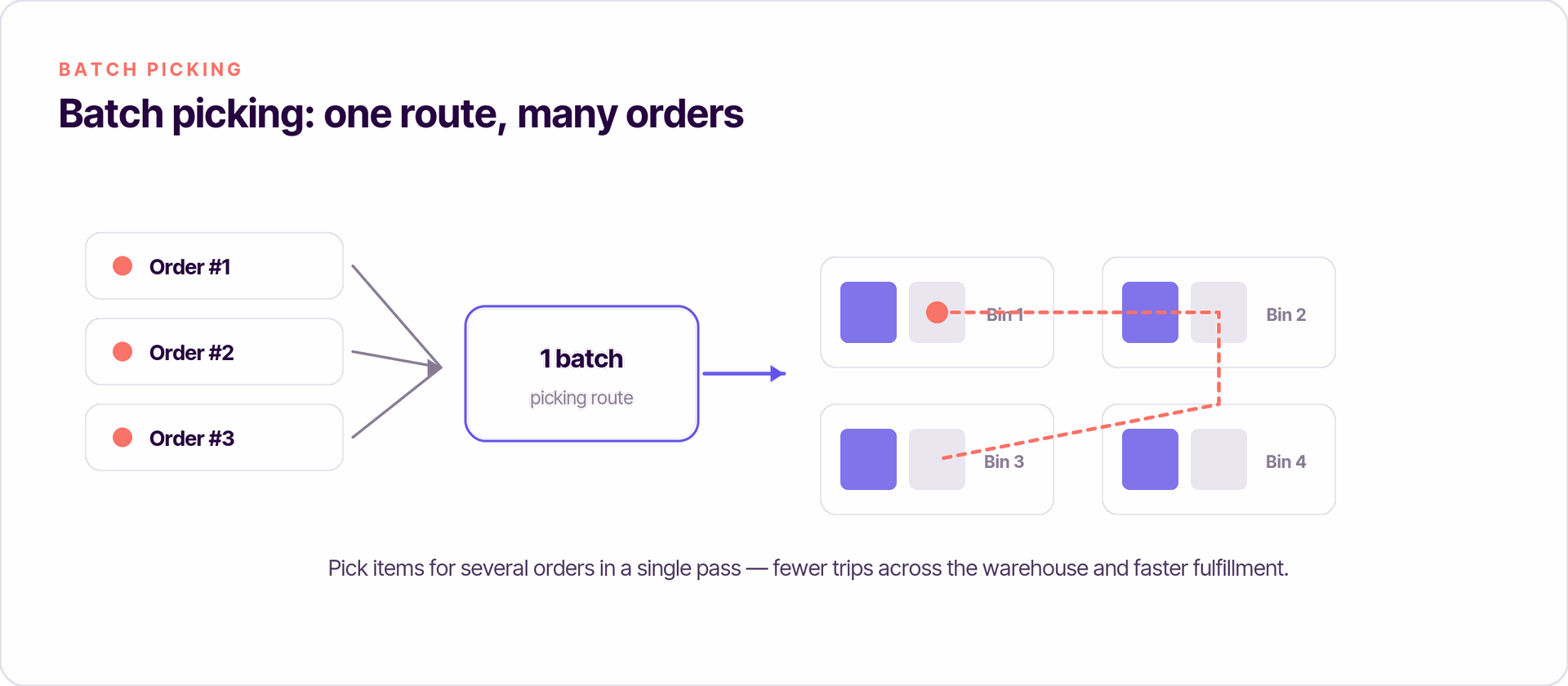
For warehouses processing large volumes of orders, batch picking allows warehouse teams to pick items for multiple orders in a single warehouse run. This significantly reduces operational costs, cuts manual effort, and improves overall warehouse operations.
Enable batch picking in Inventory > Configuration > Settings > Operations.
Automated Stock Replenishment
One of the most powerful features of the Odoo warehouse management system is its ability to automate purchase orders based on reordering rules for stronger stock control. Instead of relying on manual tracking, Odoo monitors stock levels continuously and triggers inventory replenishment when needed. This improves operational efficiency and enhances customer satisfaction.
Setting Up Reordering Rules
Go to Inventory > Configuration > Reordering Rules and define:
- Minimum stock levels — use them to set minimum stock levels so replenishment works as both an inventory replenishment and stock control function
- Maximum stock levels — the target quantity after replenishment
- Preferred supplier — Odoo automatically creates a purchase order when the minimum is reached
These smart replenishment strategies eliminate stockouts, reduce excess storage costs, and support continuous stock monitoring for better operational efficiency, while helping teams fulfill orders more reliably and improve customer satisfaction.
Automated Stock Replenishment in Action
When Odoo detects that a product has fallen below its minimum and maximum stock threshold, it automatically creates a draft purchase order. Your purchasing team only needs to review and confirm — significantly reducing manual labor and the risk of human error.
Inventory Tracking and Reporting
Odoo provides a comprehensive suite of reporting tools to monitor inventory performance and support data-driven decisions across your supply chain operations.
Key Reports for Warehouse Managers
- Stock Moves — Inventory > Reporting > Stock Moves — a complete log of every stock movement, including incoming and outgoing shipments and inter warehouse transfers
- Inventory Valuation — tracks the financial value of your stock in real time
- Forecasted Inventory — projects future stock levels based on confirmed sales and purchase orders
- Inventory Adjustments — a record of all manual corrections to stock quantities
These advanced reporting tools give warehouse managers the real time visibility they need to identify inventory discrepancies, forecast demand, and optimize warehouse space.
Quality Control in Warehouse Operations
Integrating quality control into warehouse processes helps businesses maintain product standards, reduce returns, and enhance customer satisfaction. Odoo supports quality checks at multiple points in the warehouse workflow.
Configure quality control checkpoints in Quality > Configuration > Control Points to trigger checks at receipt, internal transfer, or delivery. Any products that fail inspection can be quarantined or routed for review before they affect your stock levels.
Looking to automate low-stock alerts?
Reducing Operational Costs with Odoo Warehouse Management
Efficient odoo warehouse management directly reduces operational costs across the business. By automating warehouse operations, businesses can:
- Reduce operational costs through batch picking and route optimization
- Minimize manual labor with automated stock replenishment and put-away rules
- Eliminate inventory discrepancies through real time inventory tracking
- Improve customer satisfaction by ensuring accurate order fulfillment and on-time outgoing shipments
- Optimize warehouse space through better visibility of stock quantities and storage locations
- Reduce human error by replacing manual tracking with automated inventory management system processes
Integration with Other Odoo Modules
The real power of the Odoo warehouse management system comes from its seamless integration with other Odoo modules, creating a truly connected inventory management system.
- Sales integration — stock levels update automatically when sales orders are confirmed, preventing overselling
- Purchase integration — purchase orders trigger receipts and update stock quantities on validation
- Manufacturing integration — Odoo automatically creates stock movements for purchase components consumed in production
- Accounting integration — inventory valuation entries sync directly with your accounts for accurate financial reporting
- Supply chain operations — full visibility from supplier purchase orders through to customer delivery
This single platform approach eliminates data silos, reduces manual effort across departments, and makes it possible to manage your entire supply chain from one Odoo database.
Conclusion
Tracking stock movements with Odoo goes far beyond simply recording what comes in and goes out. A well-configured Odoo warehouse management system gives you real time inventory tracking, automated stock replenishment, complete traceability, and the advanced reporting tools needed to continuously improve your warehouse operations.
Whether you're managing one warehouse or a network of multiple warehouses, Odoo's inventory management system scales with your business — reducing operational costs, minimizing manual labor, and enhancing customer satisfaction at every stage of your supply chain.
Why Choose Doodex for Your Odoo Warehouse Management Implementation?
Implementing Odoo warehouse management effectively requires more than just installing the software. You need a partner who understands both the technical platform and the real operational challenges of warehouse management.
Doodex specializes in Odoo inventory and warehouse management implementations for manufacturing and distribution companies. Our team configures your odoo warehouse management system to match your warehouse processes — from setting up multiple warehouses and storage locations to building smart replenishment strategies and quality control workflows.
Ready to transform your warehouse operations? Book a free session with our Odoo specialists and discover how Doodex can help you achieve accurate inventory valuation, real time visibility, and lower operational costs.
Free
Transform Your Warehouse Operations with Doodex
Let our Odoo specialists configure your warehouse management system for real time inventory tracking, automated replenishment, and lower operational costs.
Meet Our Expertsanswered
What is Odoo warehouse management?
Odoo warehouse management is a module within the Odoo ERP platform that allows businesses to track stock movements, manage multiple warehouses, automate stock replenishment, and maintain accurate inventory valuation — all from a single platform.
How does Odoo handle inter warehouse transfers?
Odoo automatically creates the necessary warehouse documents and updates stock quantities in both source and destination locations when an inter warehouse transfer is validated. This provides real time visibility across your entire warehouse network.
Can Odoo automate purchase orders for stock replenishment?
Yes. Odoo's reordering rules allow you to set minimum and maximum stock levels for each product. When stock falls below the minimum, Odoo automatically creates a draft purchase order, significantly reducing manual effort and human error.
How does Odoo support multiple warehouses?
Odoo allows you to create and manage multiple warehouses from a single Odoo database. Each warehouse has its own locations, routes, and warehouse documents, while giving you consolidated real time visibility across your entire warehouse network.
What reporting tools does Odoo warehouse management offer?
Odoo provides advanced reporting tools including Stock Moves, Inventory Valuation, Forecasted Inventory, and Inventory Adjustments reports — giving warehouse managers the data they need to optimize warehouse operations and reduce operational costs.